
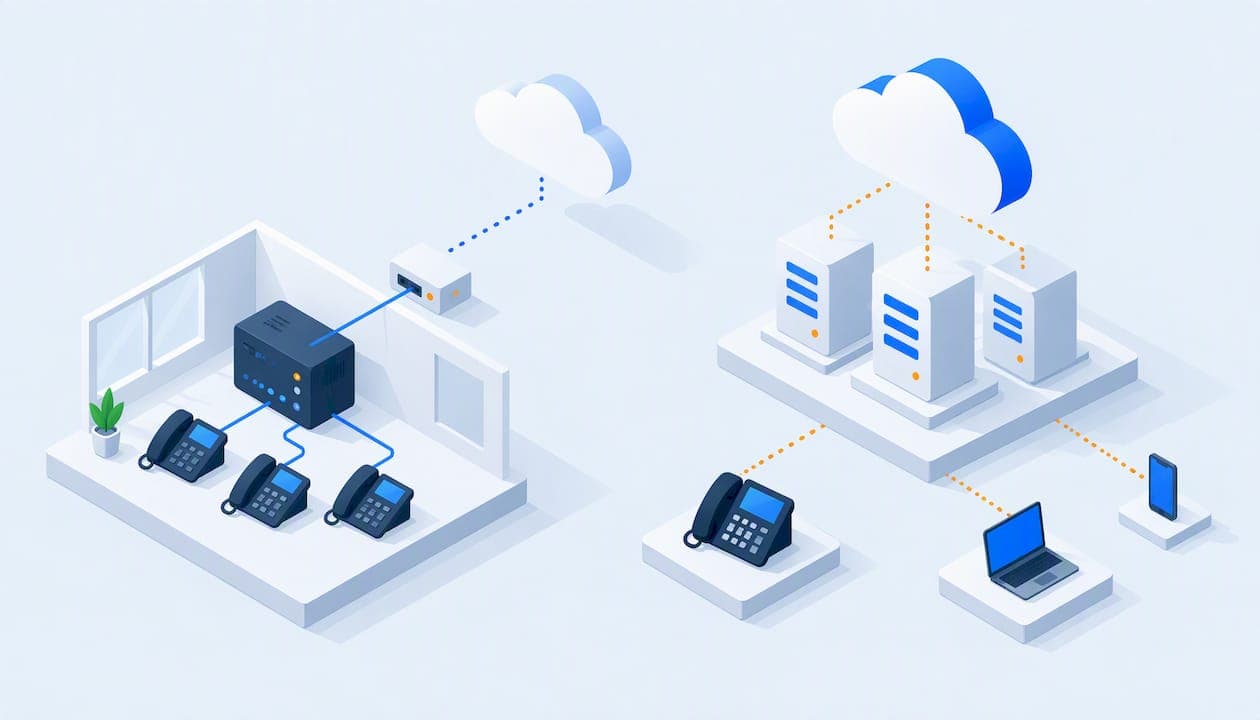
A SIP trunk and a hosted PBX are not two brands of the same product. A SIP trunk is a phone line delivered over the internet to a PBX that you own and run. A hosted PBX is the whole phone system, run by a provider, with your phones connecting to it over the internet. If you already own a working PBX, a SIP trunk can make sense. If you have no PBX, or you are tired of maintaining one, hosted is almost always the simpler path for a small business.
TL;DR
- SIP trunking replaces your old phone lines. You still own, host, secure and update the PBX behind it.
- Hosted PBX (also called cloud PBX) replaces the PBX itself. The provider runs call routing and the connection to the phone network, and you need phones and an internet connection.
- Hosted service is usually billed per phone. SIP trunks are usually billed per call path. That difference shapes your total cost more than any feature list.
- Small businesses, nonprofits, schools and hotels with no in-house phone engineer usually do better with hosted. Organizations with a PBX they cannot or will not retire often start with trunks.
- The two can coexist during a transition, but it is a bridge, not a goal.
Table of Contents
- What each one actually is
- The differences that matter day to day
- Cost: where the money really goes
- Control versus responsibility
- Security and maintenance
- Scaling, multiple locations and remote staff
- Who each option suits
- Perspective: what we see in small-business phone systems
- Emergency calling and reliability
- Can you use both?
- How to choose: a short checklist
- Special cases: hotels, schools and nonprofits
- What PJL Telecom offers
- FAQ
- Sources
What each one actually is
The confusion starts because both use SIP, the signaling protocol that sets up calls over IP networks. The difference is what sits at your end of the connection.
SIP trunking
A SIP trunk is a logical IP connection between a PBX that your organization controls and an internet telephony provider, which then connects you to the public phone network. TeleDynamics describes it as a link from an enterprise-controlled IP PBX to the provider and the phone network. The PBX still does the thinking: it routes internal calls, runs the auto-attendant, and holds voicemail. The trunk just carries calls in and out.
That PBX can be a physical box in a closet, software on a server, or a virtual machine you manage. Either way, it is yours to maintain.
Hosted PBX (cloud PBX)
In a hosted setup, the provider's servers hold the call control and the connection to the phone network. Per the same TeleDynamics comparison, the customer site needs only a VoIP endpoint, such as an IP desk phone, a softphone or an adapter, plus internet connectivity. There is no PBX at your location to buy, patch or replace.

When a reader types "cloud PBX" or "hosted PBX," they usually mean the same thing. Some vendors use "UCaaS" for hosted systems that add messaging and video, but the core idea is unchanged: the phone system is a service.
The differences that matter day to day
| SIP trunking | Hosted PBX | |
|---|---|---|
| Where the PBX lives | On your premises or a server you manage | In the provider's cloud |
| Who maintains it | You or your IT contractor | The provider |
| Equipment needed | An IP PBX, sometimes a voice gateway | IP phones, softphones or adapters, plus internet |
| Typical billing unit | Per call path (channel), plus numbers | Per phone or user, unless the plan is flat-rate |
| Control over features | Full | Less, within what the provider offers |
| Multi-site setup | Can need specialized inter-site configuration | No special multi-site configuration |
| Security responsibility | Yours | Largely the provider's |
The equipment, billing and scaling rows come from TeleDynamics' side-by-side. Now let's look at what they mean in practice.
Cost: where the money really goes
People search this topic hoping for a single price answer. There isn't one, because the two options charge for different things.
SIP trunks are priced by capacity. You pay for the number of simultaneous calls the trunk can carry, plus phone numbers, plus usage in some plans. A ten-person office that never has more than four people on calls at once might need only four channels. That can look cheap on the invoice.
But the trunk is only one line item. Behind it sits a PBX with its own costs:
- The PBX hardware or server, and its licenses
- Phones that work with that PBX
- A voice gateway, if you have analog or legacy gear
- Someone to configure, patch, back up and troubleshoot it
- Business-grade internet and often a backup connection
Hosted PBX is priced by seat, unless it isn't. Most hosted providers charge per user per month, and the bill grows with every hire, every front-desk phone, every seasonal employee. Features that sound included often arrive as add-ons: call recording, conferencing, queues.
That per-user model is the part we built PJL Telecom to avoid. Our Business plan starts at $125 per month, and it is a flat rate regardless of how many users you have. Our Home Office plan is $25 per month. Call recording, conferencing, auto-attendants, call queues, ring groups and voicemail-to-email are part of the plan, not extras.
A worked comparison
Take a 30-person nonprofit with one office, no IT staff, and a 12-year-old PBX that has started dropping calls.
- Path A, keep the PBX and add SIP trunks. You pay for trunk channels, but the old PBX still needs a maintenance contract, the next failure still means a phone call to a technician, and the phones and software age with it. Upgrading the PBX later is a second project.
- Path B, move to hosted. You retire the PBX. Staff use desk phones, apps on their mobiles or laptops, or both. Adding the 31st person is a software change, not a hardware project.
Path A is not wrong. If the PBX is relatively new and does something specific the nonprofit depends on, trunking can stretch its life. But the question to ask is not "which line item is lower?" It is "what is the total cost of owning and running everything behind that line?"
Control versus responsibility
The honest tradeoff is control. TeleDynamics says SIP trunking gives the enterprise full control over functionality and configuration, but security, administration and maintenance fall to the enterprise. Hosted reduces that burden and gives you less feature control.
For a small organization, that responsibility is usually the deciding factor, not the control. Ask yourself:
- Who patches the PBX when a vulnerability is announced?
- Who changes the call flow when your hours change at 4 p.m. on a Friday?
- Who answers the phone when the system goes down at 7 a.m.?
If the honest answer is "the owner, on a weekend," you are paying for control you do not use. If you want a view on how outsourced management of either model changes this, fixed-fee managed VoIP is one way small businesses take the operational work off their plate.
Security and maintenance
A PBX you host is part of your network, and it is a target. The US Cybersecurity and Infrastructure Security Agency's guidance on VoIP advises using a firewall, strong passwords, and patching and updating application software. That guidance is aimed at anyone running VoIP gear, and it describes the routine work a trunk-plus-PBX setup puts on you.
Another CISA document makes a related point about older systems: PBXs are often left out of a company's overall security profile and rarely upgraded. A closet PBX that "just works" can be the least-watched device in the building.

With hosted service, the provider takes on server-side patching and the systems that connect calls to the phone network. You still own the basics on your side: strong admin passwords, a sensible firewall, and phones kept up to date. We pre-configure our Grandstream phones and monitor your network proactively, so those basics are covered from day one.
Scaling, multiple locations and remote staff
This is where hosted tends to win clearly for small organizations.
- Adding users. On hosted, a new employee is an account and a phone or an app. On a trunk-and-PBX setup, you may be limited by PBX licenses, port counts or channel capacity.
- Multiple sites. TeleDynamics notes that hosted service needs no specialized multi-site configuration, while SIP-trunk multi-site deployments can require complex inter-site setup.
- Remote and mobile staff. Hosted phones register to the provider's servers, so a desk phone works at home as it does at the office, and mobile and desktop apps extend that further. With a trunk, remote users must reach your PBX, which typically means VPN or additional network configuration.
Seasonal operations feel this most. A school that adds staff in August, or a hotel that staffs up for summer, wants a phone system that follows headcount without a hardware order.
Who each option suits
SIP trunking suits you if
- You own a PBX that is paid for, supported and meeting your needs
- You have staff or a contractor who can administer, secure and update it
- You need deep customization or integration with equipment a hosted service will not support
- You want to lower the cost of the lines while delaying a platform change
Hosted PBX suits you if
- You are starting fresh or replacing an aging PBX
- You have no one on staff whose job is the phone system
- You expect to add users, locations or remote workers
- You want predictable monthly costs and a provider to call when something breaks
Most small businesses, which is who we serve, land in the second group.
Perspective: what we see in small-business phone systems
We run flat-rate hosted phone systems for small businesses, nonprofits, schools, hotels and home offices, so we are not neutral. But the pattern we see is consistent: organizations rarely regret removing the PBX closet, and they often regret per-user pricing that climbs as the team grows.
Three things matter more than the trunk-versus-hosted label:
- Who is on the hook when it breaks. A system with real human support, reachable around the clock, beats a cheaper one that sends you to a ticket queue.
- Whether the price moves when your headcount does. Per-user fees make growth expensive. A flat rate does not.
- Whether legacy equipment can come along. Fax machines, door phones and analog lines are common in hotels and schools. We use analog adapters so they keep working on the new system rather than forcing a rip-and-replace.
We also do not lock customers into contracts, and setup is included. If you are weighing a trunk against hosted because you want control, we would ask what control you will actually use, and whether a provider that makes system changes the same day gives you enough of it.
— User
Emergency calling and reliability
Whichever model you choose, 911 must work, and in a multi-line system that means more than it sounds. The FCC explains that Kari's Law requires multi-line telephone systems to support direct 911 dialing, with no prefix such as 9, and to notify a designated contact when 911 is dialed. Those rules cover systems typically found in office buildings, campuses and hotels, and they also include dispatchable location requirements under RAY BAUM'S Act. Check the FCC's page for the current details and how they apply to your setup.
Practical questions to settle before you sign anything:
- Can any phone on the system dial 911 directly, without a prefix?
- Is each phone's physical location registered correctly, including floors, rooms or suites? This is critical for a hotel or a campus.
- What happens to calls when your internet goes down? Ask about failover to a mobile app or a forwarding number.
- Who monitors the connection, and who do you call?
With a SIP trunk, that checklist is yours to build and test on your PBX, plus redundancy such as a second internet connection. With hosted, the provider should configure and document it. Ours includes E911 compliance. Do not skip a test call to confirm it after setup.
Reliability also depends on your own network. Whether you pick trunks or hosted, voice needs a stable connection and a router that prioritizes it. Proactive network monitoring catches problems before staff notice dropped calls.
Can you use both?
Yes, though it is more common in larger organizations than in small ones. A company might keep an on-site PBX at headquarters with SIP trunks and use a hosted service for a branch office or remote team. Another might run both while it migrates, keeping the old PBX on trunks until the last department moves.
For a small business, a hybrid is usually a temporary stage. Running two systems means two bills, two sets of settings and two places for a call to go wrong. If the reason for the hybrid is a few legacy devices, such as a fax line or a door phone, an analog adapter on a hosted system is usually simpler.
How to choose: a short checklist
Work through these in order:
- Do you own a PBX worth keeping? If not, skip trunking and look at hosted.
- Who maintains it? If no one, hosted.
- How many users and sites in two years? Growth favors hosted, especially with flat-rate pricing.
- What legacy equipment must keep working? List fax, alarms, door phones, analog lines. Confirm adapters or gateways cover them.
- What does 911 look like? Direct dialing, notification and accurate location for every phone.
- What is the real monthly total? Add per-user fees, feature add-ons, hardware, setup, support and any contract term.
- What is support like? Test it before you buy. Call and see who answers.
Special cases: hotels, schools and nonprofits
Hotels and motels. Guest room phones, front desk, housekeeping and back office all need to work together, and 911 location accuracy matters in every room. Our hotel phone systems start at $125 per month per property, and we have a guide to VoIP for hotels and hospitality. Smaller properties can look at our motel phone systems, also from $125 per month per property.
Nonprofits. Budget predictability beats feature depth. Per-user fees penalize organizations that rely on volunteers and part-timers. Our guide to VoIP for non-profit organizations covers the specifics.
Schools. Staff turnover, multiple buildings and seasonal headcount make flexibility the main requirement. Hosted handles all three without hardware changes.
What PJL Telecom offers
If hosted is the right direction, our flat-rate system is built for the small organizations described above. You pay one rate regardless of how many people use it. That covers unlimited users, call recording, conferencing, auto-attendants, voicemail-to-email, call queues, ring groups, mobile and desktop apps, spam call protection and E911 compliance. We include setup, offer no-contract terms, and handle system changes and support calls the same day, with real people answering around the clock.

We sell pre-configured Grandstream desk and cordless phones, conference phones, headsets and analog adapters, so legacy equipment and new phones both connect. See plans and pricing to find the fit for your team, or start from pjltelecom.com.
FAQ
Is SIP trunking cheaper than hosted PBX?
The trunk itself can be cheaper per month, because you pay for call capacity rather than per seat. But you also pay for the PBX, the phones, the maintenance and the technician. Compare the whole stack, not the line item, and include per-user fees and add-ons on the hosted side.
Do I need a PBX for a SIP trunk?
Yes. A SIP trunk connects a PBX you control to the phone network, so you need an IP PBX, and sometimes a voice gateway if you use analog equipment. A hosted PBX needs no PBX at your site, only phones or apps and an internet connection.
Is hosted PBX the same as cloud PBX?
In everyday use, yes. Both mean the provider runs the phone system on its own servers and you connect over the internet. Some vendors use the cloud label for systems with more built-in messaging and video, but the basic model is the same.
Can a hosted PBX work with old analog phones or fax machines?
Usually yes, with an analog adapter that converts the analog device to IP. Test fax lines in particular, since fax over IP can be sensitive to network quality. We supply and configure adapters for legacy equipment.
Does either option handle 911 differently?
The legal requirement for multi-line systems is the same: direct dialing, notification and dispatchable location, as the FCC describes. The difference is who configures and tests it. With a trunk and your own PBX, that is you. With hosted service, it should be the provider, and you should still confirm it with a test call.
Sources
- SIP trunks vs SIP extensions: Which to choose? (TeleDynamics)
- Understanding Voice over Internet Protocol (VoIP) (CISA)
- Recommended Practice for Securing Control Systems Modems (CISA)
- Multi-line Telephone Systems: Kari's Law and RAY BAUM'S Act (FCC)
- Stop Surprise Bills: Managed VoIP With Fixed Fees for Small Business